Announcements

  1. ๐ŸŽ‰ November 2025

    Improvement
    Fix

    Version 8.1.6 (Released November 17)

    [This release looks a little delayed because we've been working hard to improve our admin and back end systems to provide faster responses and more reliable updates.]

    We've got big releases planned for Benchmark--but we're very excited to announce the long-awaited arrival of...


    Dashboard Report Chart Guides

    You can now see the calculation, data sources and some suggested use-cases for each chart by clicking the info icon in the top-right corner of the chart.


    dashboard-tooltips-nov2025

    We also deployed a number of critical fixes and updates:

    โœ… What's New & How It Helps You

    More reliable data saving

    Fixed issues where your entries weren't being saved properly on Pages 1A and 1B, so your work is never lost.

    Better data privacy

    Compensation Reports now correctly restrict access to only organizations that have submitted their own surveys.

    Smoother permission management

    Resolved a permission issue in Analytics Contribution Tracker that prevented some users from submitting or unlocking data as expected.

    ๐Ÿ”ง Fix Highlights

    Benchmark

    • Fixed Page 1A square footage data not saving after error messages appeared
    • Resolved Page 1B issue where deleted answers weren't being saved

    Compensation

    • Blocked access to Compensation Reports for organizations that haven't submitted any surveys

    Management Modules

    • Fixed permission issue in Analytics Contribution Tracker that affected submitting and unlocking data

    System Improvements

    • Enhanced notification visibility for better user feedback
    • Improved interface readability on organization identifiers

    Let us know if you have questions or spot anything unexpected โ€” we're always listening!

  2. ๐ŸŽ‰ July 2025

    Improvement
    Fix
    Release Notes

    Version 8.1.5 (Released July 10)

    โœ… What's New & How It Helps You

    Better organization management

    Admins can now mark organizations as testing accounts, keeping your real data separate from training or demo scenarios.

    Clearer module naming


    "Data Supply History" is now called "Analytics Contribution Tracker" to better reflect what it actually shows you.

    Smoother cohort building

    Fixed error messages in Cohort Builder so you can create custom groups without confusing roadblocks.

    ๐Ÿ”ง Fix Highlights

    Management Modules

    • Fixed Cohort Builder error messages that prevented creating custom cohorts
    • Corrected typo in My Custom Cohort error message
    • Applied proper capitalization to Data Settings radio button labels
    • Renamed Data Supply History to Analytics Contribution Tracker

    Compensation

    • Resolved permissions issue in Survey & Participants > Respondents that showed incorrect messages

    System Improvements

    • Enhanced user tracking capabilities for better platform insights
    • Streamlined database structure by removing outdated columns

    Let us know if you have questions or spot anything unexpected โ€” we're always listening!

  3. ๐ŸŽ‰ June 2025

    Improvement
    Fix
    Release Notes

    Version 8.1.2 (Released June 12)

    Version 8.1.3 (Released June 26)

    What's New & How It Helps You

    ๐Ÿ“Š More reliable charts and data

    Chart calculations now work consistently across all budget groups, and visual elements are cleaner without distracting borders.

    ๐Ÿ‘๏ธ Better visibility into your data

    Long-term benefits responses are now visible on Page 6, and Data Supply History shows clear messages when no interaction logs are available.

    ๐Ÿ”’ Smarter access controls

    Organizations can only see respondent lists after submitting their own data, and custom permissions now display properly regardless of Benchmark access settings.

    โœจ Smoother form experience

    Confetti animations no longer block your actions after submission, and multi-position rows display correctly in read-only views.

    ๐Ÿ”ง Fix Highlights

    Benchmark

    • Resolved visual issues on Pages 2A, 2B, and 5B
    • Updated message when no non-performance spaces exist on Page 2B
    • Removed chart borders and cleaned up tooltips across all bar charts
    • Fixed Touchstone Reports access for non-submitters
    • Corrected Dashboard revenue calculations and currency handling
    • Capitalized "Revenues" label in Earned Revenues table

    Compensation

    • Fixed missing responses in Page 6 Long Term Benefits section
    • Resolved Pages 4 and 5 organization structure inconsistencies
    • Corrected budget group logic in respondent reporting
    • Updated outdated survey references throughout the platform

    Settings

    • Added Data Supply History visibility for Benchmark interactions
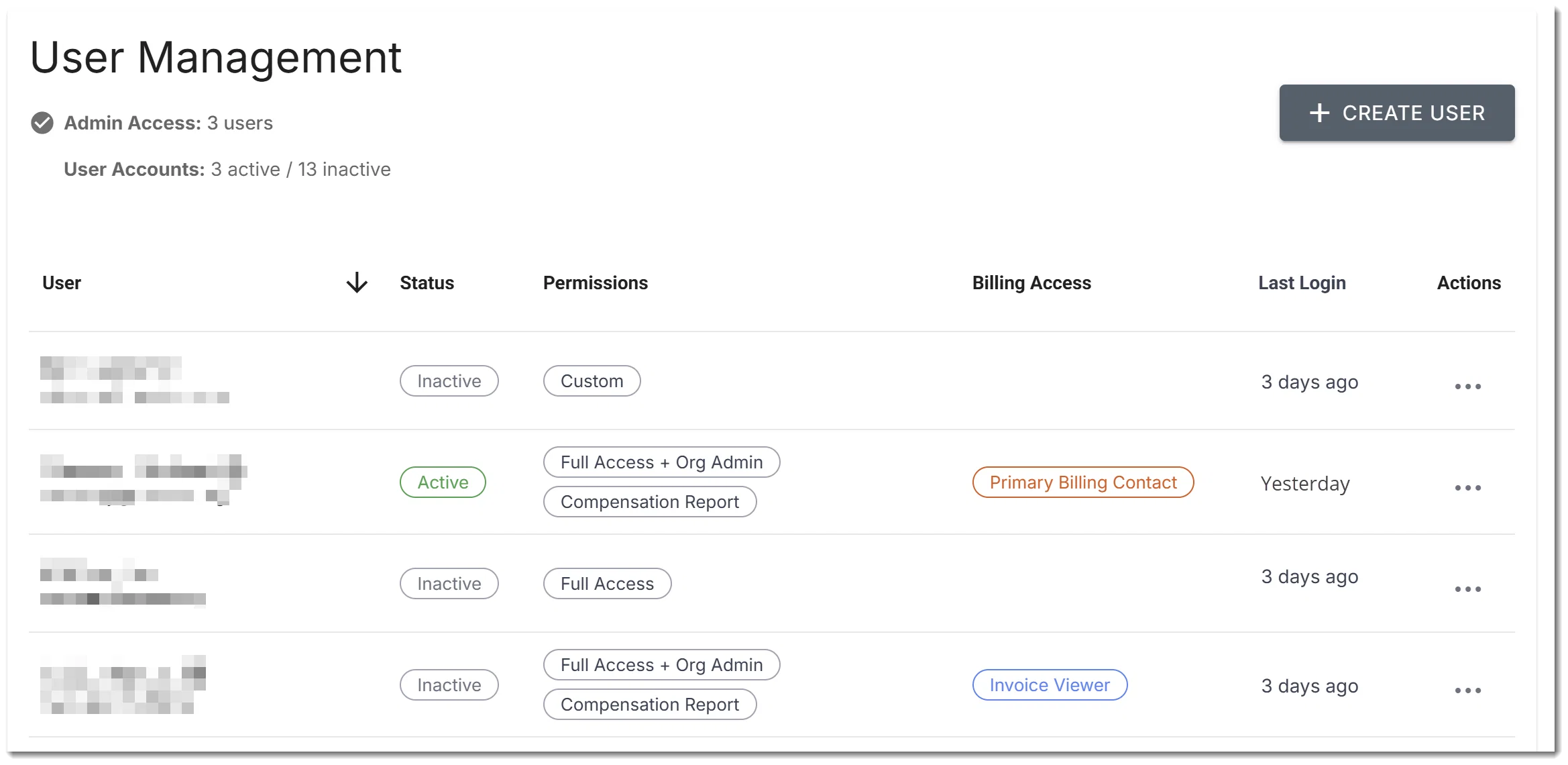
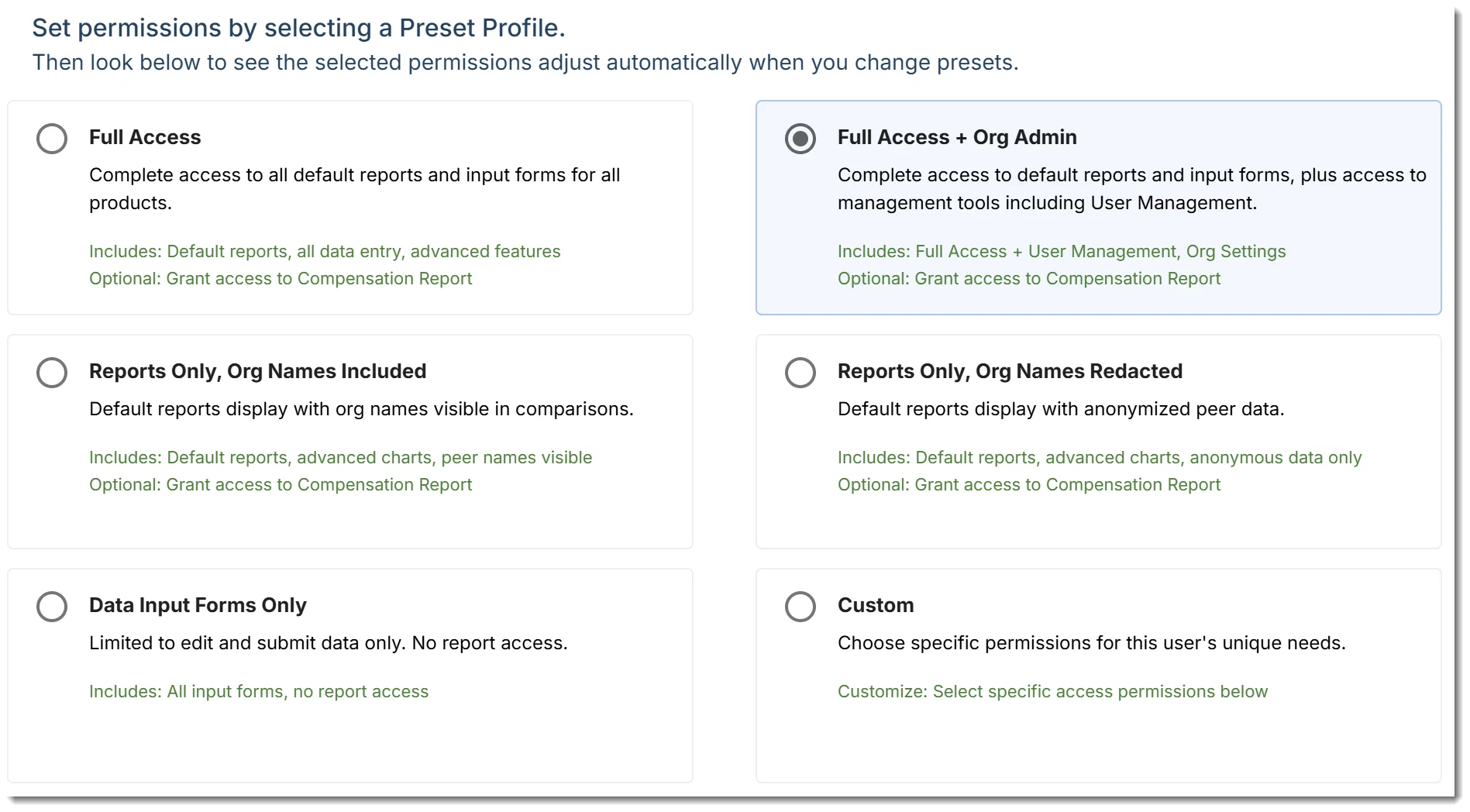
    • Fixed User Management custom permissions display
    • Resolved Organization Chart read-only view issues with multi-position rows
    • Corrected Survey Page dropdown ordering
    • Made User Status mandatory in user creation
    • Updated section titles for consistency

    Let us know if you have questions or spot anything unexpected โ€” we're always listening! ๐Ÿ‘‚

  4. ๐ŸŽ‰ April 2025

    Announcement
    Release Notes

    Version 8.1.0 (Released April 3)

    Version 8.1.1 Patch (Released April 8)


    Whatโ€™s New & How It Helps You

    โœ… Cleaner financial data

    Reconciliation bugs and calculation issues are resolved, so your reports reflect accurate totals.

    ๐Ÿ” Better consistency across forms

    Compensation Pages 4 and 5 now mirror your Org Chart structure, making input smoother and more predictable.

    ๐ŸŸข Validation works as expected

    Green checkmarks now appear reliably when data is saved โ€” no more second guessing.

    ๐ŸŒ Improved international support

    Dashboards have better handling for non-USD currencies, and license payments via Stripe redirect correctly for global users.


    ๐Ÿ”ง Fix Highlights

    Benchmark

    • Fixed form bugs and data overwrites on Page 1B
    • Resolved currency issues on the Dashboard
    • Improved consistency in Average Days Use per Venue across reports
    • Rebuilt reconciliation inputs for more reliable entry

    ๐Ÿ‘ฅ Compensation

    • Corrected "Fill from previous year" issues for outsourced positions
    • Standardized layout between Pages 4 & 5
    • Blocked access to reports for organizations that havenโ€™t submitted surveys

    Let us know if you have questions or spot anything unexpected โ€” we're always listening! ๐Ÿ‘‚

  5. February 2025

    Release Notes
    Improvement

    Version 8.0.0

    image

    Enhancements

    Benchmark

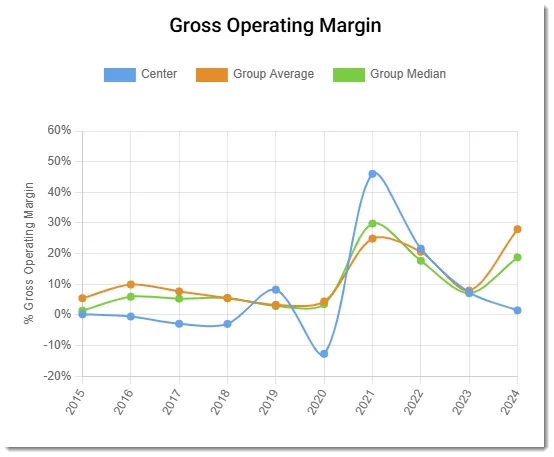
    Implemented correct calculations for key financial and attendance metrics, including:

    • Gross Operating Margin
    • Percent of Tickets Sold
    • Total Revenue per Patron
    • Earned Revenue per Patron
    • Marketing Cost per Patron
    • Occupancy Cost per Square Foot
    • Personnel as a % of Total Operating Expense
    • And more...

    We also pushed some important improvements:

    • Updated frontend display for charts to ensure accuracy and consistency.

    and...

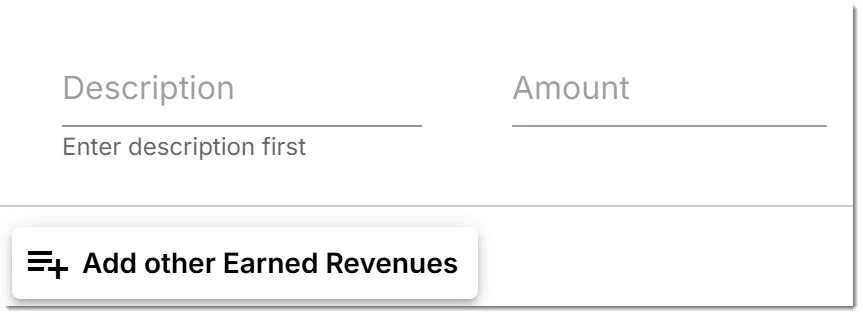
    Improved reconciliation data input workflow for better usability--you can now enter as many "other" expenses or revenues as needed

    • Until now there was only room for 3, now to add more
    • Just click the "Add other" button to create a new row, then enter your Description and Amount

    image

    Compensation

    • Resolved data input workflow issues, including removing unnecessary horizontal scrollbars.
    • Improved calculation accuracy for charts displaying median and average compensation values.
    • Enhanced "Total Compensation" and "Benefits" sections in the Principal Administrator report by fixing missing charts and incorrect user messages.

    Bug Fixes

    Benchmark

    • Fixed an infinite loading issue in Data Supply History when selecting "Go to Input Forms."
    • Addressed conversion issues affecting data input forms across multiple pages.

    Compensation

    Resolved errors in data entry steps, including:

    • Placeholder and input focus issues
    • Amount field not entering an error state
    • Green checkmarks not displaying during the save process

    Other Updates

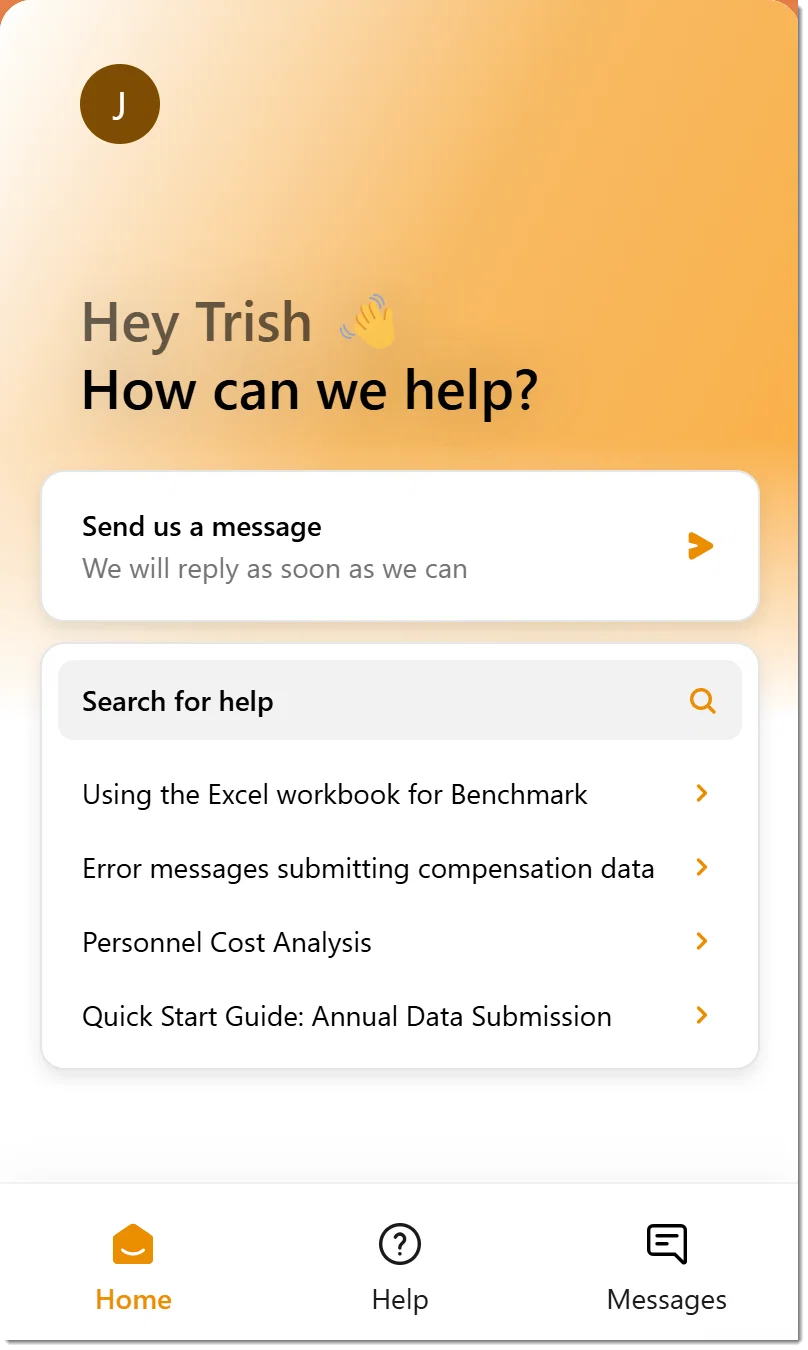
    • Installed and integrated Intercom Messenger with user validation.
    • Added environmental controls to allow for more flexible deployments

    image


    This release focuses on improving calculation accuracy, refining data input workflows, and enhancing overall usability. Let us know if you have any feedback! ๐Ÿš€

  6. July 2024

    Release Notes
    Improvement

    Version 7.1.1 // Released August 2, 2024

    New Features

    data_supply

    Survey History is now Data Supply

    • Refactored Survey History to make it easier for users to understand the state of their data "supply" by identifying what data is included in reports, and what data is not
    • Streamlined navigation available on each row; it's now much more obvious what options are available or not based on submission status

    respondents-screen

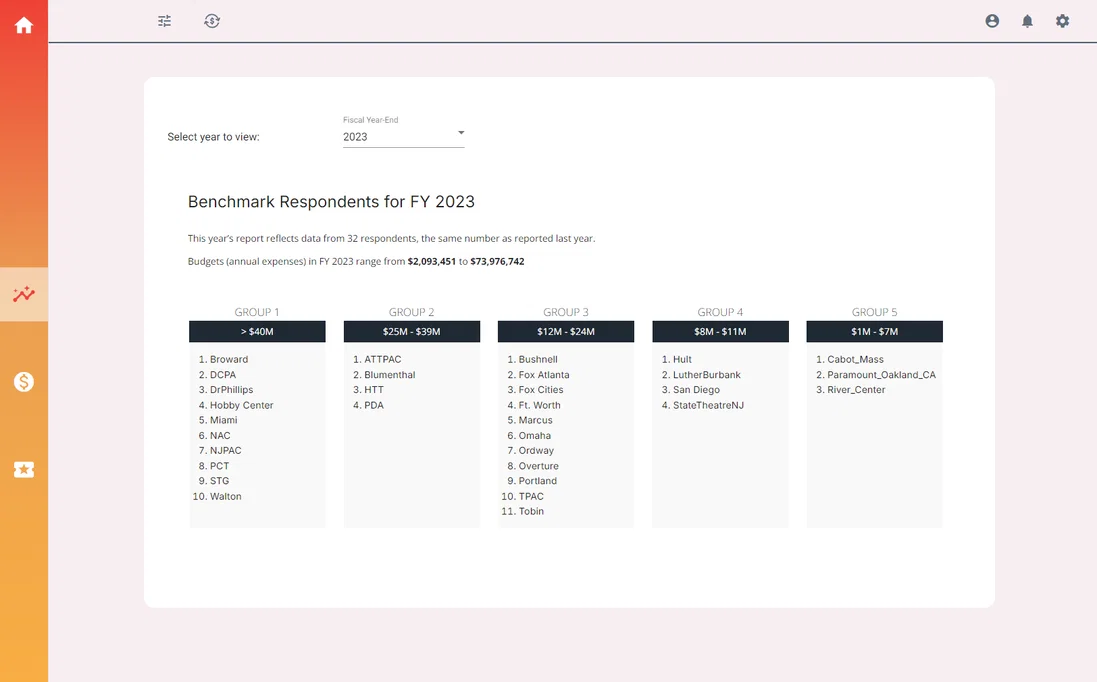
    Introduced Respondents page on Benchmark

    • You can now view a list of organizations who have contributed data on Benchmark!
    • Organizations are grouped by budget size and are now listed by a shortened version of their name to help make the list more legible

    Enhancements

    Benchmark and Compensation Modules

    • Streamlined the respondents component to make it easier to understand who submitted data for which years
    • Updated styling across various elements, including the design of fields, background, and label formats, to improve overall user interface consistency and readability.
    • Adjusted data presentation, including hiding unnecessary decimals in numeric fields and ensuring that subheadings only display relevant information.

    Bug Fixes

    Data Handling

    • Corrected issues with data settings not being saved correctly in the Custom Cohort module.
    • Fixed problems with specific fields in Compensation that were not retaining user input.
    • Resolved an issue that was preventing the completion of the License Activation flow.

    User Experience

    • Fixed various display issues, including modal windows that were not appearing under certain conditions and improved the handling of null and zero values in key fields.
    • Resolved footer visibility problems which was hidden for some users.
    • Addressed mismatches between data status and last action indicators.

    Other Updates

    General Improvements

    • Implemented minor usability and design enhancements to improve overall user experience
    • Corrected visual alignment in a number of places and corrected formatting throughout the application to increase visual consistency and reduce friction when switching modules

    User submitted ideas we shipped...

    3

    Add a "Respondents" page for Benchmark

    It will enable users to know both the quantity and identities of the organizations that have completed the Benchmark by fiscal year, much like the "Respondents" section in Compensation

    Paloma
    ๐Ÿš€ Shipped

    0

  7. June 2024

    Release Notes
    Improvement

    Version 7.2.0

    Improvements

    • Improved form and field validations across the application for better user experience.
    • Enhancements to Compensation inputs [affects selected users]
    • Enhanced data tables and chart displays in Benchmark analytics.

    Bugs

    Compensation Module

    • Resolved multiple visual issues and error handling problems in forms and pages.
    • Improved progress tracking and form validation processes.

    Benchmark Module

    • Fixed alignment and chart size issues.
    • Enhanced data table structures for better information display.

    Miscellaneous

    • Refined currency handling and fixed error messages.
    • Fixed modals and buttons and removed deprecated code that was preventing display in certain cases

    User submitted ideas we shipped

    2

    Revise benefits paid-by source

    Adjust benefits data to reflect that percentage paid by employer vs employee can be variable within an organization

    Lauren Frankel
    ๐Ÿš€ Shipped

    2

    --> Turns out, this information is not germane to the compensation evaluations most users conduct. So we removed this input altogether.

    2

    Allow negative ROI

    allow negative numbers on page 6 endowment ROI

    Lauren Frankel
    ๐Ÿš€ Shipped

    1

    --> We removed ROI inputs altogether.

    Coming next month

    3

    Add a "Respondents" page for Benchmark

    It will enable users to know both the quantity and identities of the organizations that have completed the Benchmark by fiscal year, much like the "Respondents" section in Compensation

    Paloma
    ๐Ÿš€ Shipped

    0

    --> Requests for this feature date back long before we started tracking feedback with Frill. We're excited to share this improvement with you very soon.

  8. April 2024

    Release Notes

    Version 7.1.1

    We deployed over 100+ fixes and minor improvements in April.

    We're on the road to reimagining a new Cohort Builder as well as updating the way the platform keeps you informed as you input data. We know data entry isn't super fun for most people, but we'd like it to be as smooth a process for you as we can.

    ---

    Improvements and Fixes

    Compensation // config & Org Chart

    • Enhanced messages for missing information, better validation for operating expenses,
    • Added necessary sub-level data, improved sorting of users by levels and sub-level
    • Fixed delays in rendering organization charts.

    Benchmark // improvements to reporting

    • Improved handling of missing information, hidden irrelevant buttons,
    • Adjustments to forms and tables, prevented zero values, and enhanced chart displays
    • Updated message display conditions, fixed chart references, and improved tooltip formats

    Integrations

    • Added Intercom support and updated data sent to Appcues.
  9. March 2024 Release Notes

    Release Notes

    Version 7.1.0

    New Features

    image

    Org Chart tool - major upgrade

    • The org chart now accepts roles for levels 1 - 7 (prior to upgrade it allowed only 5)
    • Also, you can now add as many roles per level as you need
    • Layout is cleaner and more responsive, plus the look & feel is more in line with our new gorgeous style guide
    • For example, you can now add Marketing Manager, Marketing Coordinator, and Digital Marketing Manager to Marketing/Level 3

    image

    Better Demographics in Compensation

    • Removed fields that are no longer relevant: Union/Management, Shared Service, and Months
    • Introduced new fields because you asked: Overtime Status, # months per year, Workplace
    • Clearer data entry - itโ€™s now easier to follow whatโ€™s required and whatโ€™s not, and what information might still be missing as you complete the data entry
    • Updated design to comply with our new, more beautiful style guide

    image

    Improvements

    • Simplified the way complex charts display so they are easier to read
    • We made charts render faster, and gave all the tooltips, axis labels, and naming conventions manicure
    • We cleared out some cob webs that got into the database, and it renders some complex data much faster now
    • We improved how the logic from โ€œFill from previous yearโ€ works (Compensation inputs)

    Bug Squashing

    • Tooltips fixed on dozens of charts
    • Fixed the min/max % of bonus issues on Compensation inputs
    • Fixed an issue in Survey History where Compensation is not displayed as "In Progress" despite having already started it

    User ideas shipped in this release

    2

    Include on-site/remote/hybrid information

    Note this in the data entry for each role

    Lauren Frankel
    ๐Ÿš€ Shipped

    1

    2

    Don't require min/max on bonus

    Adjust bonus percentage min/max input to be clearer for organizations that give discretionary bonuses unconnected to percentages

    Lauren Frankel
    ๐Ÿš€ Shipped

    0

    1

    Demographics - add field for overtime status

    Exempt / Non-exempt; this information is standard in the HR field and will help HR leaders relate more accurately to the roles they support

    Jordan Gross-Richmond
    ๐Ÿš€ Shipped

    0

    51

    Expand number of roles permitted on Org Chart

    Make it possible to include more than one role/individual in one grid on the org chart and collect demographics for all roles

    Lauren Frankel
    ๐Ÿš€ Shipped

    0

  10. Say farewell to the Analytics Suite!

    Announcement

    performance analytics by AMS

    Welcome to Performance Analytics - our new platform brand

    AMS Analytics and the analytics tools have evolved tremendously since their humble origins as excel files and pdf reports.

    We are proud and honored to know the the tools have grown to be considered invaluable resources for PAC efforts in strategic planning, institutional communication, continuity planning and more.

    As the product evolved with you, our subscriber, it became apparent that the brand was overdue for a renovation. We wanted a name and outward appearance that better reflects our intensions as a firm and our subscribers---sophisticated and ever-evolving.

    Your work and that of your organization is inspiring and professional--approachable and critical to the success of our society. (I know that sounds big, but it is!)

    Welcome to Performance Analytics, the new name and user experience for the suite of analytical tools formerly known as Analytics Suite. AMS Analytics will remain the LLC entity behind the platform.

    The platform itself will undergo a major upgrade in the coming weeks, but in the meantime, you can explore the new look here: https://www.getperformance.com

    7